Architecture
This section explains the components involved in SenseOps Writeback and how they interact.
Components
| Component | Description |
|---|---|
| Qlik Sense Application | Hosts the Writeback Extension on a sheet, where users enter and edit data. |
| Writeback Extension | The custom object added to Qlik Sense. Captures user input and sends it for processing. |
| License Key Validation | Validates the SenseOps license before writeback operations are processed. |
| Destination | Where writeback data is ultimately stored — a flat file (CSV, TXT, QVD) for File-Based Writeback, or a database for Database-Based Writeback. |
File-based Writeback Architecture
For file-based destinations, the Writeback Extension writes data directly to the destination file, with license validation handled by SenseOps.
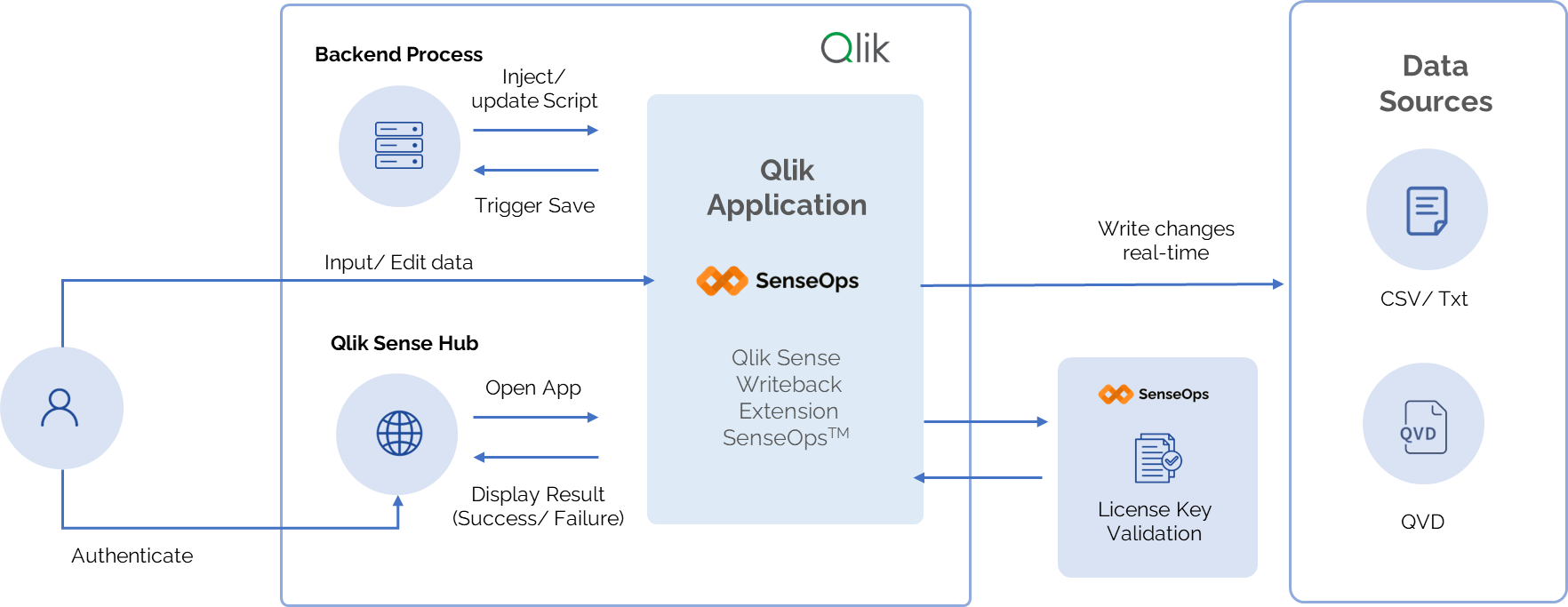
How it works:
The Qlik Application, hosting the Writeback Extension, sits at the center of three independent interactions:
-
User access and data entry : The user authenticates through the Qlik Sense Hub, which opens the Qlik Application and returns the result of authentication (success or failure). Once in the application, the user inputs or edits data directly within the Qlik Sense Writeback Extension.
-
Backend automation (optional) : Independently of the user, a backend process can inject or update scripts directly into the Qlik Application. The Qlik Application responds by triggering a save.
-
License validation : The Writeback Extension maintains a connection with the SenseOps License Key Validation service, sending license checks and receiving validation responses to confirm the extension is licensed for use.
Once data is entered or updated whether by a user or through backend automation the Qlik Application writes the changes directly and in real time to the configured data source without requiring the application to reload.