Architecture
This section explains the components involved in AskSenseOps and how they interact with Microsoft 365 Copilot and Qlik Sense Enterprise.
Components
| Component | Description |
|---|---|
| Microsoft 365 Copilot | Where business users ask questions, add charts and build dashboards, in Teams or M365 Copilot. |
| AskSenseOps Agent | The Copilot Studio agent that understands the request and passes it to AskSenseOps. |
| Data Gateway | A Microsoft gateway installed on the AskSenseOps server. It connects outward to Microsoft, so no inbound port is opened for Copilot. |
| AskSenseOps Server | Hosts the AskSenseOps Qlik tools and the web portal, where chat and saved dashboards are available in a browser. |
| Qlik Sense Enterprise | Provides the published apps, with their master measures and dimensions, that AskSenseOps reads from. |
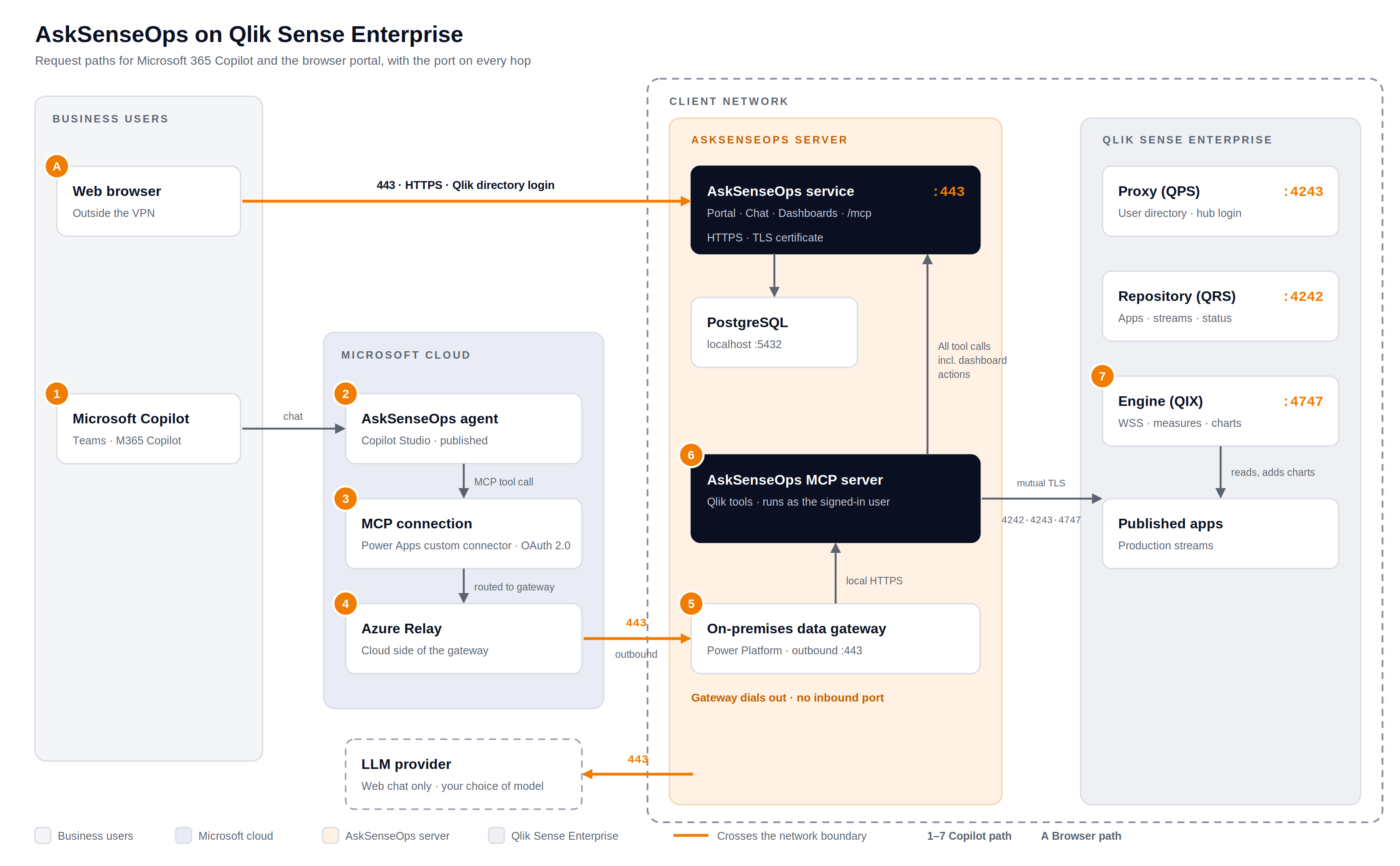
AskSenseOps Architecture on Qlik Sense Enterprise
AskSenseOps is installed on a server inside your network. Copilot requests reach it through the Data Gateway, and everything that touches Qlik stays within your network.
How it works:
The AskSenseOps server sits at the center of three interactions:
-
Asking questions and adding charts in Copilot : The user types a request in Copilot. The AskSenseOps agent sends it to Microsoft's secure relay, and the Data Gateway on your server collects it over its own outbound connection. AskSenseOps then reads the matching published app in Qlik Sense and replies with the answer, naming the app, stream and last reload time it came from. For charts, AskSenseOps adds the chart to the Qlik app, so everyone with access to that app sees it in the Qlik hub. This needs update rights on the app, granted through Qlik Management Console security rules.
-
Building dashboards : The user names an app and describes the dashboard in Copilot. AskSenseOps builds it and saves it to the Dashboards tab of the web portal. The Qlik app is not changed. Users open the dashboard in a browser over HTTPS on port 443 and sign in with their Qlik credentials.
-
Web portal and chat : Users can also open the portal directly in a browser. They sign in with their Qlik account, and chat uses the language model you configure. Web chat is the only feature that needs a connection from the server to a model provider.
Answers always come from published apps in production streams, and they use each app's own master measures and dimensions, so figures match your existing Qlik dashboards.
Network and Security at a Glance
| Area | What to know |
|---|---|
| Inbound | Only port 443 (HTTPS) to the AskSenseOps server, for the web portal. Copilot needs no inbound port. |
| Outbound | Port 443 from the Data Gateway to Microsoft. Qlik ports 4242, 4243 and 4747 are used inside your network only. Web chat also needs port 443 to the language model provider. |
| Sign-in | Copilot users sign in with their Microsoft work account. Portal users sign in with their Qlik account. |
| Permissions | Requests run as the signed-in user, so existing Qlik access rules and row-level security still apply. |
| Encryption | Every connection uses HTTPS or secure WebSockets. |
For server, software and network requirements, see Prerequisites. To connect Copilot, see MCP Integration Setup.