How SenseOps unifies your developer
teams

Track & Compare Changes
Get visibility on all versions of your build at granular levels.Track and compare changes to scripts, expressions, visuals, connections and extensions.Simplify what it takes to review code, control and govern multiple versions.

Multi-Branching
Take a branch of existing code, develop and test changes in a safe and isolated way before merging updates into a main branch. SenseOps enables quick comparison and configurable workflows to secure code integrations to the parent branch.

Single-Click Build Progression
Minimise all the manual efforts and risks involved in deployments. Get your teams to schedule tasks and move code with pre-defined checks. SenseOps Code Management makes it easy and instant to organise, deploy and trace all code movements.

Git Agnostic
Connect and work across any of the popular platforms such as GitHub, BitBucket, GitLab or connect to a local GitHub Repository using built-in APIs.
Regression Testing
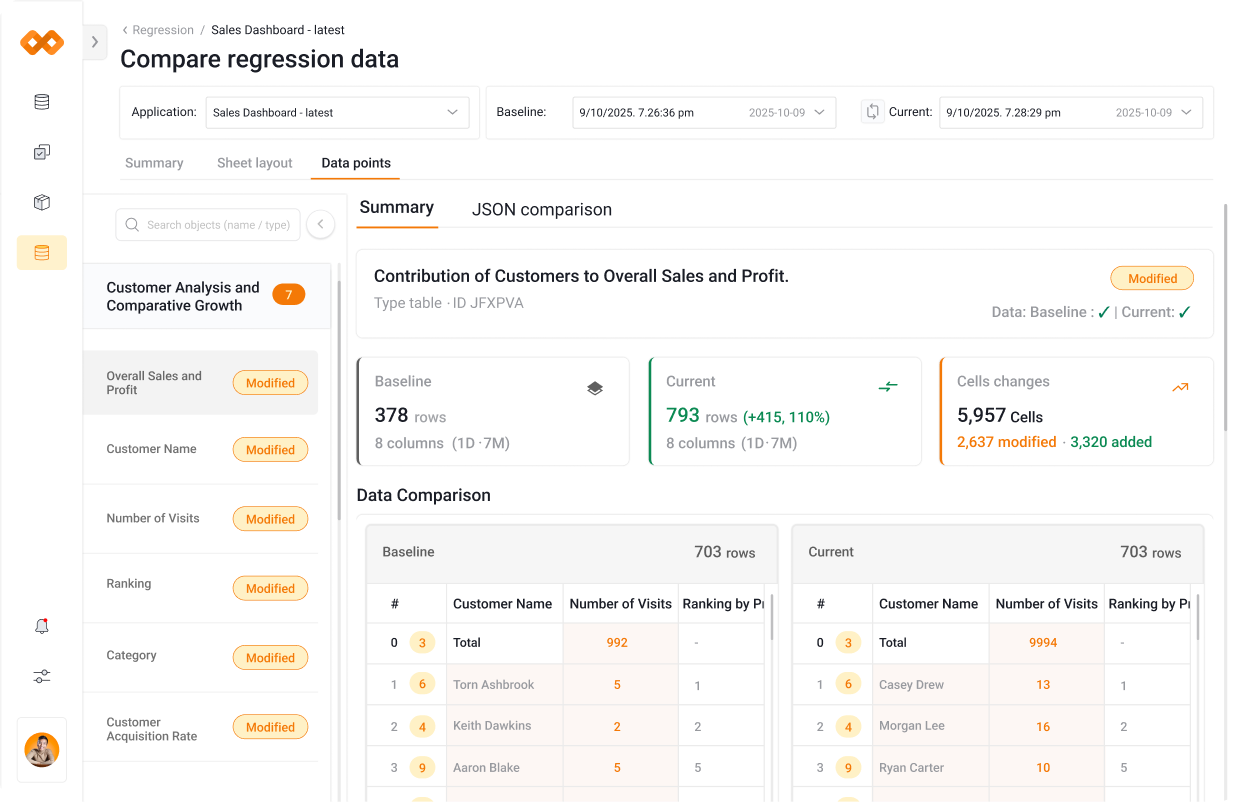
Validate every change before release with automated regression testing for Qlik apps. SenseOps compares data, visuals, layouts, and performance against a baseline to quickly detect breaks, reduce manual QA, and ensure confident, error-free deployments.
Track & Compare Changes
Get visibility on all versions of your build at granular levels.Track and compare changes to scripts, expressions, visuals, connections and extensions.Simplify what it takes to review code, control and govern multiple versions.
Multi-Branching
Take a branch of existing code, develop and test changes in a safe and isolated way before merging updates into a main branch. SenseOps enables quick comparison and configurable workflows to secure code integrations to the parent branch.
Single-Click Build Progression
Minimise all the manual efforts and risks involved in deployments. Get your teams to schedule tasks and move code with pre-defined checks. SenseOps Code Management makes it easy and instant to organise, deploy and trace all code movements.
Git Agnostic
Connect and work across any of the popular platforms such as GitHub, BitBucket, GitLab or connect to a local GitHub Repository using built-in APIs.
Regression Testing
Validate every change before release with automated regression testing for Qlik apps. SenseOps compares data, visuals, layouts, and performance against a baseline to quickly detect breaks, reduce manual QA, and ensure confident, error-free deployments.